

Restore Power / Display
GPL GPL Cafe
Restore Power / Display
Guides the operator through verifying basic power connections when the main display is dark.
- Damage to power cord found: Unplug immediately and tag out of service.
Checklist
Guided Diagnostic Steps
Work from low-risk checks toward technician-level inspection only when evidence supports it.
You can read or print the route now. The first checkbox click opens the service contact gate.
- 1
Verify Power Connection
operator-intermediatelowEnsure the machine's power cord is fully inserted into a functioning wall receptacle.
Expected: Machine receives power and the display activates.
Evidence to note: photo
- 2
Check for Internal Faults
operator-intermediatelowOpen the machine door. If the display is still dark, verify the interlock switch position, but do not probe internal wiring.
Stop conditions- Burning smell when door is opened
Expected: Display lights up when door is opened/interlock is engaged, or remains dark indicating internal failure.
Evidence to note: note
- 3
Disable Free Vend Configuration
operator-intermediatelowEnter the programming mode and navigate to the SETUP CONFIGURATION menu to turn off the Free Vend setting.
Expected: Machine requests payment before dispensing.
Evidence to note: note
- 4
Inspect Payment Hardware
operator-intermediatelowVisually check the coin mechanism and bill validator for obvious jams or disconnected harnesses. Do not remove or disassemble.
Expected: Identification of a physical blockage or loose connection.
Evidence to note: photo
- 5
Check and Replenish Filter Paper
operator-intermediatelowOpen the door and inspect the filter paper roll. Ensure paper is properly positioned under the empty switch and under the paper rollers.
Expected: Filter paper is present and the empty switch detects it.
Evidence to note: note
- 6
Empty Liquid Drain Tray
operator-intermediatelowLift the float and chain assembly out. Pull the drain tray straight out and empty it in a suitable location.
Expected: Drain tray is empty and float mechanism drops to its lowest position.
Evidence to note: note
- 7
Read All Active Faults
operator-intermediatelowOpen the door and press the designated fault review button to scroll through any active errors.
Expected: A list of active error codes or NOERR is displayed.
Evidence to note: note
Tools for this route
Location Help
Where to find this
Use this as orientation before touching the machine. It is location help, not a repair instruction.
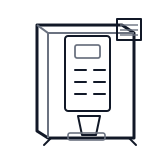
Start at the front door payment column; match the display, keypad, coin, bill, or card device to the symptom before opening deeper panels.
- Main electrical connection from the wall receptacle to the machine power supply.
- Power cord
- Wall plug
- Main fuse or breaker
Do not open energized or protected electrical areas unless a qualified technician or licensed electrician is handling the work.
cabinet hot beverage payment column
 display keypad
 power supply
Parts status
Exact public parts list not verified yet. Use this route to identify the system before ordering.
Candidate areas for part verification
Other Possible Issues
Switch routes if this symptom is not the closest match.