

Product Not Dispensing After Payment
VendnetUSA 3596
Product Not Dispensing After Payment
This diagnostic sequence checks everything from product jams within the storage area, through the dispensing motor, and down to the sensors to figure out why a paid selection isn't being delivered.
Qualified technician handoff: stop before live electrical testing, sealed-system refrigeration work, compressor service, or protected-compartment access unless a qualified technician is handling the work.
- motor smoking or unusually hot: unplug machine immediately, do not re-attempt vend, replace motor
- repeated jamming across multiple columns: stop and investigate product compatibility and tray alignment before further vends
- controller error code displayed: record code and consult manufacturer documentation before proceeding
- If the motor is smoking or excessively hot, immediately unplug the machine and call a qualified technician for motor replacement.
Checklist
Guided Diagnostic Steps
Work from low-risk checks toward technician-level inspection only when evidence supports it.
You can read or print the route now. The first checkbox click opens the service contact gate.
- 1
Check the physical product path for any visible jams or obstructions.
operator-intermediatehighCheck the physical product path for any visible jams or obstructions.
Digital MultimeterFlashlight or Work LightStop conditions- If the motor is smoking or excessively hot, immediately unplug the machine and call a qualified technician for motor replacement.
- If repeated jamming occurs, a qualified technician must inspect the product compatibility and tray alignment before any further attempts.
- If the controller displays an error code, a qualified technician should consult the manufacturer's diagnostic guide before proceeding.
Expected: Initial condition is documented before deeper diagnosis.
Evidence to note: note
- 2
Confirm the payment system has successfully registered the transactio...
operator-intermediatehighConfirm the payment system has successfully registered the transaction amount.
Digital MultimeterFlashlight or Work LightStop conditions- If the motor is smoking or excessively hot, immediately unplug the machine and call a qualified technician for motor replacement.
- If repeated jamming occurs, a qualified technician must inspect the product compatibility and tray alignment before any further attempts.
- If the controller displays an error code, a qualified technician should consult the manufacturer's diagnostic guide before proceeding.
Expected: Initial condition is documented before deeper diagnosis.
Evidence to note: note
- 3
Check the physical product path for any visible jams or obstructions.
operator-intermediatehighCheck the physical product path for any visible jams or obstructions.
Digital MultimeterFlashlight or Work LightStop conditions- If the motor is smoking or excessively hot, immediately unplug the machine and call a qualified technician for motor replacement.
- If repeated jamming occurs, a qualified technician must inspect the product compatibility and tray alignment before any further attempts.
- If the controller displays an error code, a qualified technician should consult the manufacturer's diagnostic guide before proceeding.
Expected: Result is documented before continuing the route.
Evidence to note: note
- 4
Confirm the payment system has successfully registered the transactio...
operator-intermediatehighConfirm the payment system has successfully registered the transaction amount.
Digital MultimeterFlashlight or Work LightStop conditions- If the motor is smoking or excessively hot, immediately unplug the machine and call a qualified technician for motor replacement.
- If repeated jamming occurs, a qualified technician must inspect the product compatibility and tray alignment before any further attempts.
- If the controller displays an error code, a qualified technician should consult the manufacturer's diagnostic guide before proceeding.
Expected: Result is documented before continuing the route.
Evidence to note: note
- 5
Inspect the vend motor for unusual heat or smoke.
operator-intermediatehighInspect the vend motor for unusual heat or smoke.
Digital MultimeterFlashlight or Work LightStop conditions- If the motor is smoking or excessively hot, immediately unplug the machine and call a qualified technician for motor replacement.
- If repeated jamming occurs, a qualified technician must inspect the product compatibility and tray alignment before any further attempts.
- If the controller displays an error code, a qualified technician should consult the manufacturer's diagnostic guide before proceeding.
Expected: Result is documented before continuing the route.
Evidence to note: note
- 6
Review the product storage area for signs of misalignment or jamming...
operator-intermediatehighReview the product storage area for signs of misalignment or jamming across multiple columns.
Digital MultimeterFlashlight or Work LightStop conditions- If the motor is smoking or excessively hot, immediately unplug the machine and call a qualified technician for motor replacement.
- If repeated jamming occurs, a qualified technician must inspect the product compatibility and tray alignment before any further attempts.
- If the controller displays an error code, a qualified technician should consult the manufacturer's diagnostic guide before proceeding.
Expected: Result is documented before continuing the route.
Evidence to note: note
- 7
If an error code is displayed, record the code immediately.
operator-intermediatehighIf an error code is displayed, record the code immediately.
Digital MultimeterFlashlight or Work LightStop conditions- If the motor is smoking or excessively hot, immediately unplug the machine and call a qualified technician for motor replacement.
- If repeated jamming occurs, a qualified technician must inspect the product compatibility and tray alignment before any further attempts.
- If the controller displays an error code, a qualified technician should consult the manufacturer's diagnostic guide before proceeding.
Expected: Result is documented before continuing the route.
Evidence to note: note
- 8
Terminal: Product jam cleared
operator-intermediatehighTerminal: Product jam cleared
Digital MultimeterFlashlight or Work LightStop conditions- If the motor is smoking or excessively hot, immediately unplug the machine and call a qualified technician for motor replacement.
- If repeated jamming occurs, a qualified technician must inspect the product compatibility and tray alignment before any further attempts.
- If the controller displays an error code, a qualified technician should consult the manufacturer's diagnostic guide before proceeding.
Expected: Result is documented before continuing the route.
Evidence to note: note
- 9
Terminal: Vend motor replacement needed
operator-intermediatehighTerminal: Vend motor replacement needed
Digital MultimeterFlashlight or Work LightStop conditions- If the motor is smoking or excessively hot, immediately unplug the machine and call a qualified technician for motor replacement.
- If repeated jamming occurs, a qualified technician must inspect the product compatibility and tray alignment before any further attempts.
- If the controller displays an error code, a qualified technician should consult the manufacturer's diagnostic guide before proceeding.
Expected: Result is documented before continuing the route.
Evidence to note: note
- 10
Terminal: Product compatibility check
operator-intermediatehighTerminal: Product compatibility check
Digital MultimeterFlashlight or Work LightStop conditions- If the motor is smoking or excessively hot, immediately unplug the machine and call a qualified technician for motor replacement.
- If repeated jamming occurs, a qualified technician must inspect the product compatibility and tray alignment before any further attempts.
- If the controller displays an error code, a qualified technician should consult the manufacturer's diagnostic guide before proceeding.
Expected: Result is documented before continuing the route.
Evidence to note: note
Tools for this route
Location Help
Where to find this
Use this as orientation before touching the machine. It is location help, not a repair instruction.
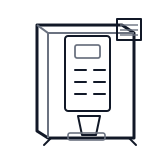
Start at the front door payment column; match the display, keypad, coin, bill, or card device to the symptom before opening deeper panels.
- Physically moves coffee pods from storage to delivery area upon controller command.
- vend motors
- drive linkages
- dispensing paddles or augers
Do not open energized or protected electrical areas unless a qualified technician or licensed electrician is handling the work.
cabinet hot beverage control board generic
 payment column
 display keypad
Parts status
Exact public parts list not verified yet. Use this route to identify the system before ordering.
Candidate areas for part verification
Other Possible Issues
Switch routes if this symptom is not the closest match.